Sometimes a book is in your library but its audio file isn't on your phone — after a reinstall, a manual file deletion, or mid-download. This page covers what you'll see and how to recover it.
The Not on Device section
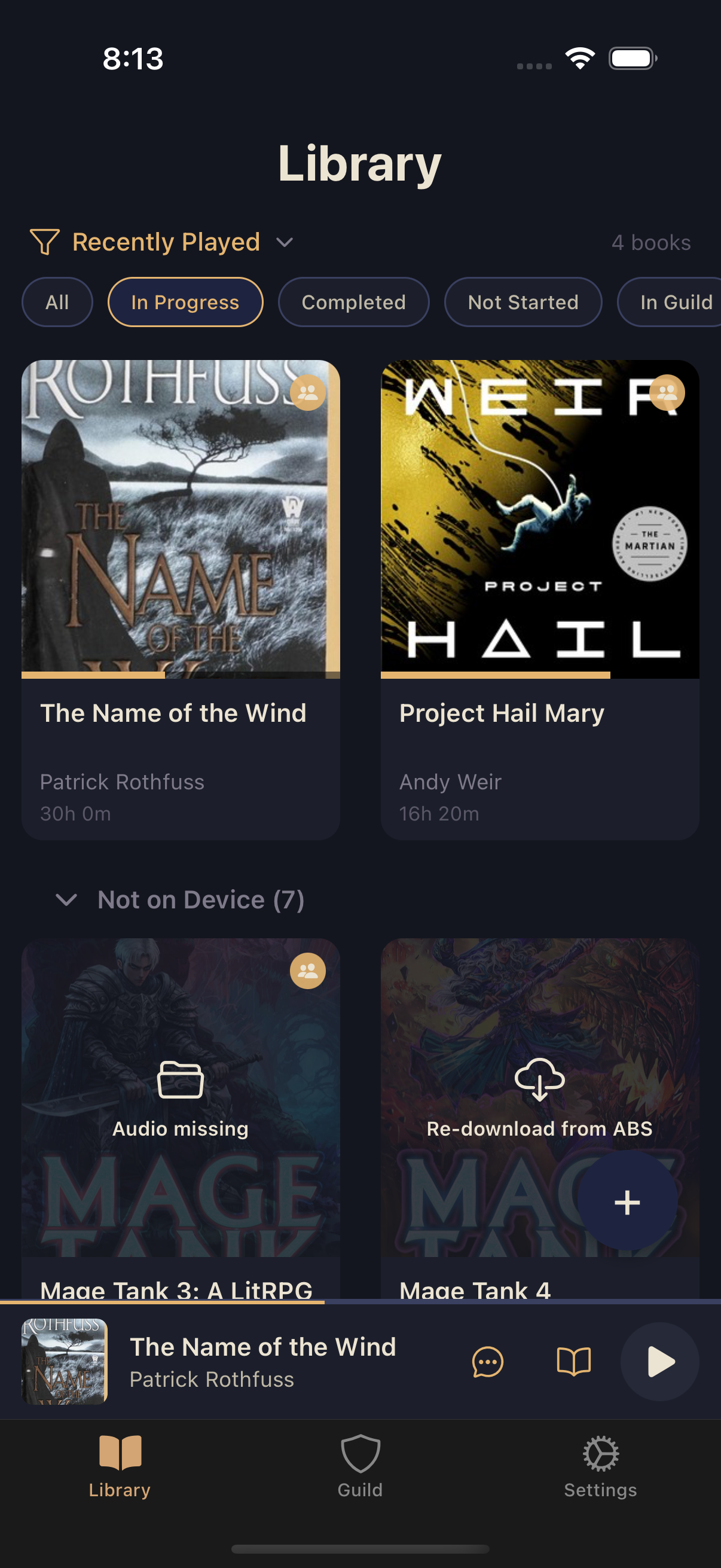
Any book whose audio isn't on your device collects under a collapsible Not on Device section (and its own filter chip) instead of mixing in with your playable books. Each tile tells you why:
- Audio missing (folder icon) — a locally imported book whose file is gone. Tap it to re-import.
- Re-download from ABS (cloud icon) — a book that came from an Audiobookshelf server. Tap it to pull the audio back down.
Download progress
While a book's audio is downloading, its card shows a live "Downloading N%" label with a thin progress bar underneath. Tapping a book that's still downloading just lets you know it's not ready yet — there's nothing to play until it finishes.
Recovering a single missing book
Tapping a missing book prompts you to either bring it back or set it aside:
- Re-download / Re-import — for an Audiobookshelf book, this reconnects and re-downloads automatically (prompting you to sign back in first if your session expired); for a locally imported book, it reopens your file picker so you can choose the file again.
- Move to Archive — if you don't want the book back right now. See managing your books for what archiving does.
Either path keeps your progress and comments exactly where they were.
After a reinstall
If your whole library shows as missing at once — the classic post-reinstall moment — Squabble swaps the Library screen for a dedicated Restore your books list instead of scattering everything under one filter. Tap a book to bring it back individually, or use Select books to archive to bulk-clear anything you don't want to restore.